Account View
This page lists all accounts in the system and allows users to initiate connections using those accounts.
Administrators or authorized users can access account details, view passwords, or initiate connections from this section.
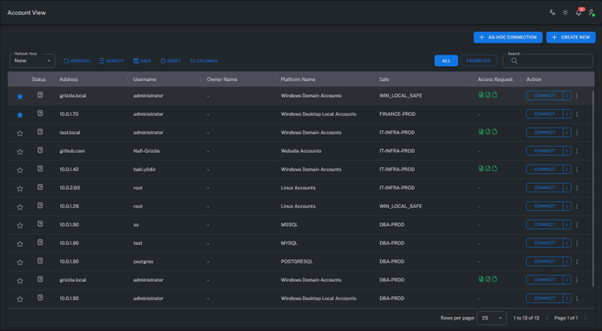
Actions related to each account can be performed through the “…” (three dots) menu on the right-hand side.
Show
Displays the password of the selected account.
This action is only available to users with the appropriate permissions.
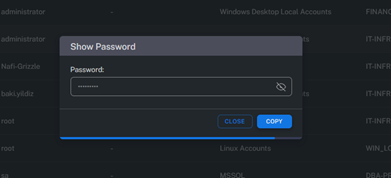
Note: Password viewing actions are typically logged according to policy and subject to audit review.
Copy
Copies the account password to the clipboard.
When the copy action is performed, a notification appears in the bottom-left corner of the screen as shown below:

For security reasons, the copied password may be automatically cleared from the clipboard after a certain time.
Edit
Allows editing of account information.
Within this section, the following modifications can be made:
- Change platform
- Change Safe
- Update account name
- Change password
- Define automatic password rotation permissions
All changes are recorded in system logs and can be audited if necessary.
Delete
Deletes the selected account from the system.
This action is irreversible and can only be performed by authorized users.
Deleted account references may still remain in the associated Safe or audit logs for traceability.
Summary
The Account View page serves as the main interface for accessing privileged accounts.
From here, users can view, copy, edit, or delete account credentials.
All actions are logged and monitored according to Grizzle ZT-PAM security policies.