Live Connection
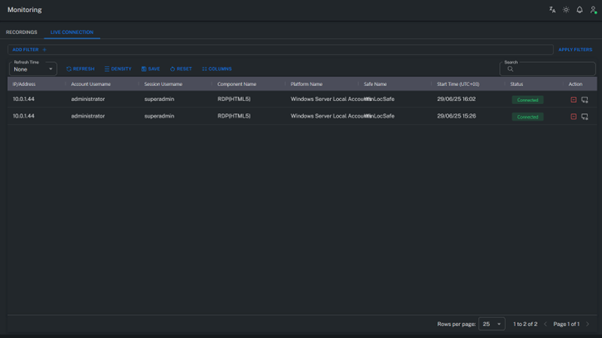
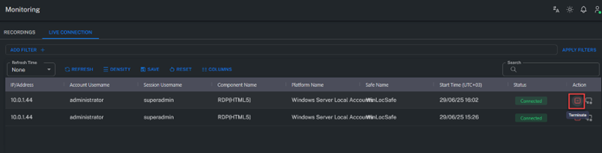
This page allows administrators to monitor and manage active sessions (ongoing privileged connections).
It provides real-time visibility into user sessions currently active on the Grizzle ZT-PAM platform.
Live Session View
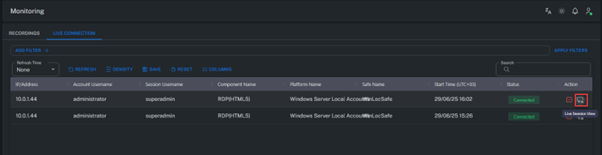
The Live Session View enables administrators to observe active sessions in real time.
Administrators can view the live screen output of the session and monitor user activities as they happen.
Live Session Join
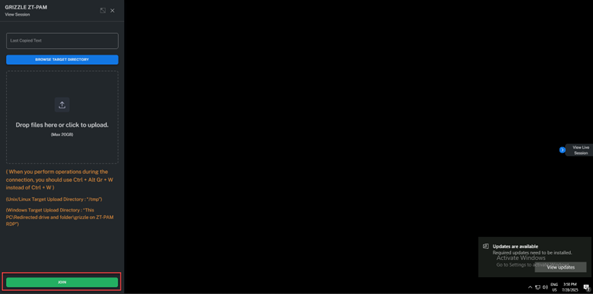
The Live Session Join feature allows administrators to not only watch but also interactively take control of a live session.
This capability is especially useful during support, training, or security response operations.
Steps to Use:
- Press CTRL + ALT + SHIFT to open the left-side menu.
- Click the Join button.
- A “join” notification is sent to the user, and the administrator gains access to the session.
Ending the Join Session (Unjoin)
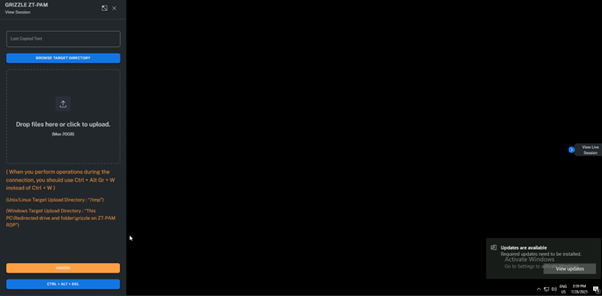
- Open the left menu again and click Unjoin.
- A “unjoin” notification can be sent to the user.
- This action immediately revokes the administrator’s access to the session.
Live Session Terminate
The Live Session Terminate function allows an administrator to immediately end an active session.
Once terminated, the user’s connection is closed, and the full session recording is transferred to the Recordings section.
Summary
The Live Connection page enables administrators to view, control, and terminate all active sessions within the system.
This feature provides fast response capabilities for operational support as well as for handling potential security incidents.