Privileged Session Management
Privileged Session Management (PSM) is a security component that allows an organization to control, record, and audit privileged user sessions (such as admin, root, or sysadmin) accessing critical systems.
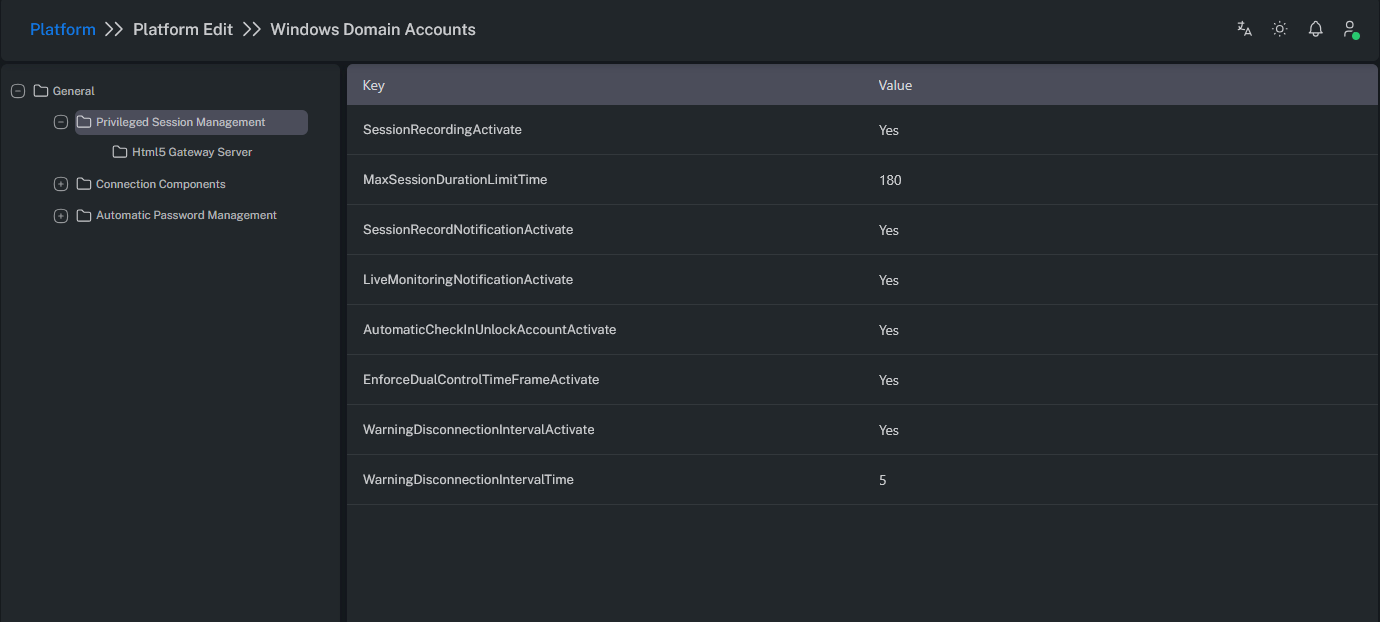
Parameters
| Parameter Name | Description |
|---|---|
| SessionRecordingActivate | Enables session recording. |
| MaxSessionDurationLimitTime | Defines the maximum session duration (in minutes). |
| SessionRecordNotificationActivate | Displays a notification to inform the user when the session is being recorded. |
| LiveMonitoringNotificationActivate | Sends a notification to the user during a live monitoring session. |
| AutomaticCheckInUnlockAccountActivate | Automatically performs a check-in after the session ends. (This works if check-in is enabled at the platform level.) If automatic check-in is disabled, the user must manually perform the check-in. |
| EnforceDualControlTimeFrameActivate | Determines whether the time frame defined in the Dual Control request will be enforced during the session. If enabled, sessions are terminated either at the end of the Dual Control time frame or the MaxSessionDuration (whichever occurs first). The user receives a warning before disconnection, based on the WarningDisconnectionInterval value. |
| WarningDisconnectiontIntervalActivate | Enables the display of a warning message before the session is disconnected. |
| WarningDisconnectiontIntervalTime | Defines the number of minutes before disconnection when the warning message is displayed. |
HTML5 Gateway Server
The HTML5 Gateway Server is a web-based session gateway that enables users to securely connect to privileged systems directly through a web browser — without the need to install additional clients such as RDP or SSH.
Advantages
Clientless Access: Users don’t need to install RDP/SSH clients — only a browser is required.
Secure Proxy Layer: Credentials are never exposed to the user; the gateway handles authentication in the background.
Recording and Auditing: The entire session screen and command history are recorded.
Multi-Platform Support: Works across Windows, macOS, Linux, iPad, and Android — all via browser.
Zero Trust Compatible: Users are not given direct network access; only the session stream is delivered.
Session Policy Enforcement: Copy-paste, file transfer, and clipboard policies can be enforced at runtime.
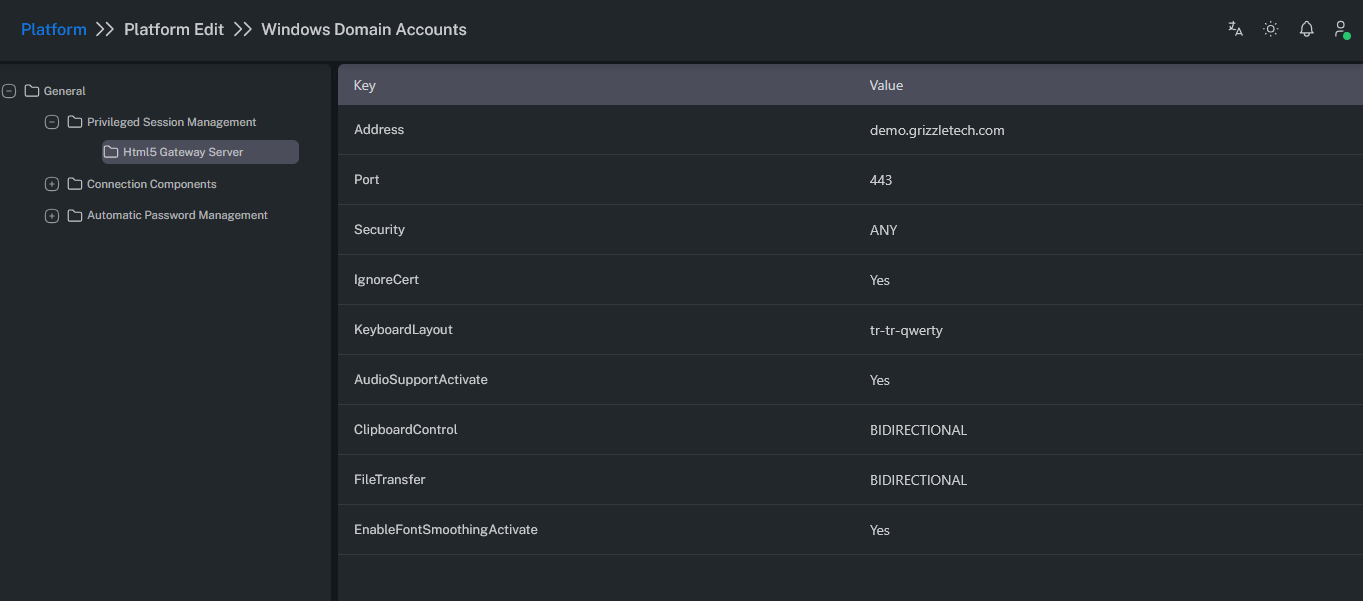
HTML5 Gateway Parameters
The following parameters are available for configuring HTML5 Gateway connections:
| Parameter Name | Description |
|---|---|
| Address | The configured address of your Web Gateway server. Can be defined as an IP address or FQDN. |
| Port | The port number configured for your Web Gateway server. |
| Security | Defines the security requirements between the Web Gateway and target system. any: Automatically selects the best available option (tries NLA, TLS, then RDP in order). |
| IgnoreCert | Allows the Web Gateway to accept connections regardless of certificate validity. |
| KeyboardLayout | Defines or forces the desired keyboard layout during the connection. Example: tr-tr-qwerty , en-us-qwerty |
| AudioSupportActivate | Enables audio support during remote sessions. |
| ClipboardControl | BIDIRECTIONAL: Enables two-way clipboard copy/paste between client and target. CLIENT_TO_SERVER: Allows copying only from client to target. SERVER_TO_CLIENT: Allows copying only from target to client. NONE: Disables clipboard copy/paste between client and target. |
| FileTransfer | BIDIRECTIONAL: Enables two-way file upload and download between client and target. CLIENT_TO_SERVER: Allows uploading files from client to target only. SERVER_TO_CLIENT: Allows downloading files from target to client only. NONE: Disables file transfer between client and target. |
| EnableFontSmoothingActivate | Improves visual quality for connections made via the Web Gateway. May slightly increase video recording size. |